

Most job seekers use AI for one thing: Writing or rewriting their resume. And even that isn’t the worst use case, since I advocate using the tools available to you when you leverage them correctly. But there’s smarter ways to use AI, especially from a research angle.
I’ve been recruiting for more than 18 years, and in almost every first screen, a candidate will discuss a project in GREAT DETAIL that isn’t anywhere on their resume. This is where AI can help you find gaps like that, and I’ll explain a tactic of how so. It can also help you figure out which jobs are worth your time, research a company before you apply, prepare for interviews, and see which people in your network can actually help.
This guide covers the nine strategies from my “Using AI in Your Job Search” webinar presented this past week for the Masshire Lowell Career Center with Bob McIntosh. You don’t need a paid AI plan for any of it. Paid plans add automation and deeper research, and I’ll point out where that matters.
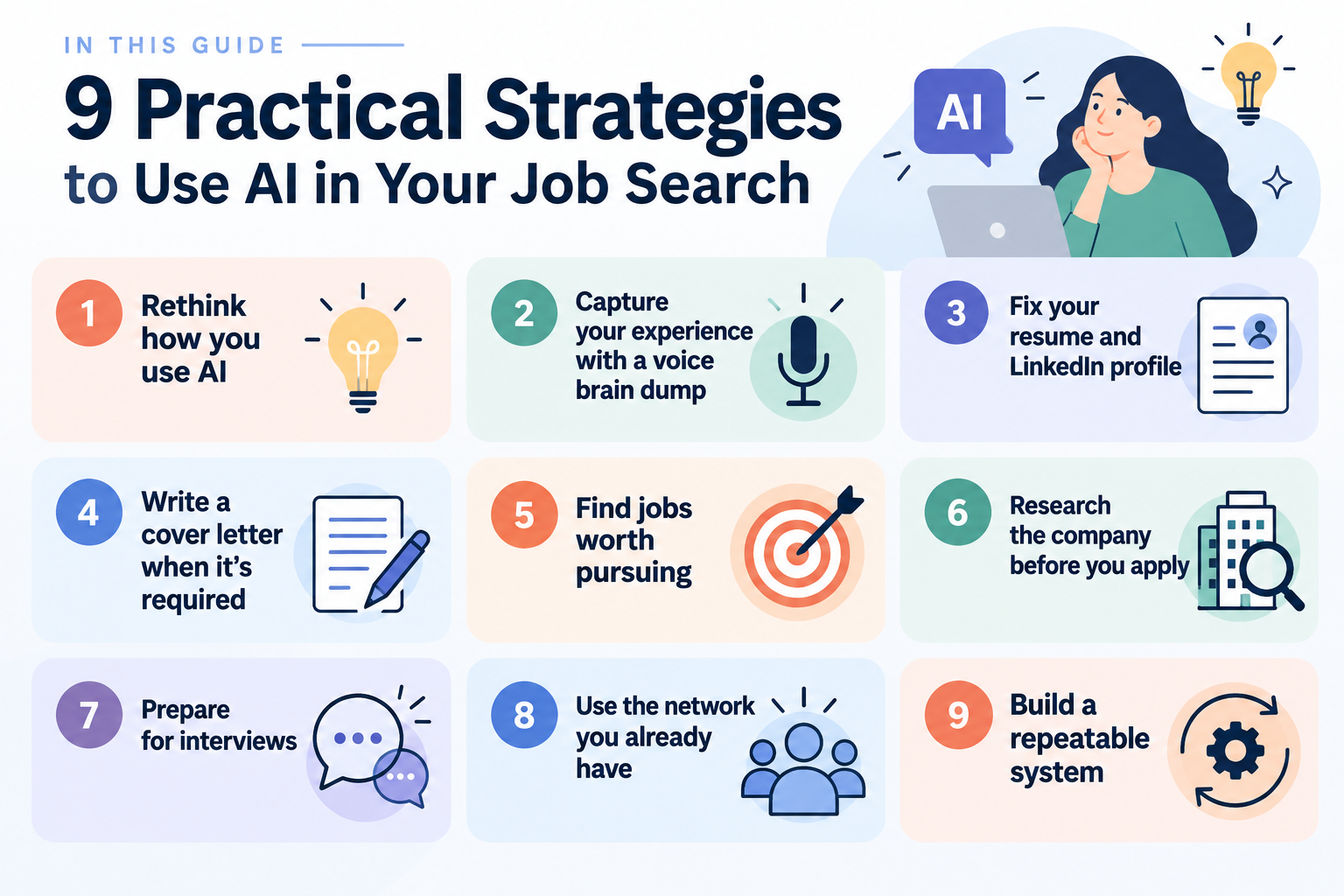
In this guide
1. Why using AI to rewrite your resume isn’t enough
Tools like ChatGPT and Claude predict the most likely next words based on patterns in their training. They aren’t search engines, and they aren’t databases of facts. What you get out depends almost entirely on what you put in and how you ask.
That’s why asking AI to “write my resume” for a job title produces something generic. It has nothing specific to work with, so it gives you what it would give anyone, and recruiters and hiring managers now recognize it quickly.
The better uses are the ones most people skip: turning your raw experience into usable material, seeing where you’re competitive, researching companies, practicing interviews with real feedback, and finding the right people in your network. The rest of this guide covers each one.
2. How to use voice AI to find experience missing from your resume
Resumes get written from memory, sitting at a laptop, which is exactly when people undersell themselves. You edit as you type, and the interesting details get cut before they reach the page.
Talking fixes that. Open voice mode in ChatGPT or Claude, use an app like Otter, or use your phone’s built-in dictation and paste the transcript into a chat. Talk through two things:
- Two or three recent projects: the situation, what you did, and what happened.
- A normal week or day. This surfaces skills people forget to list because they feel too obvious.
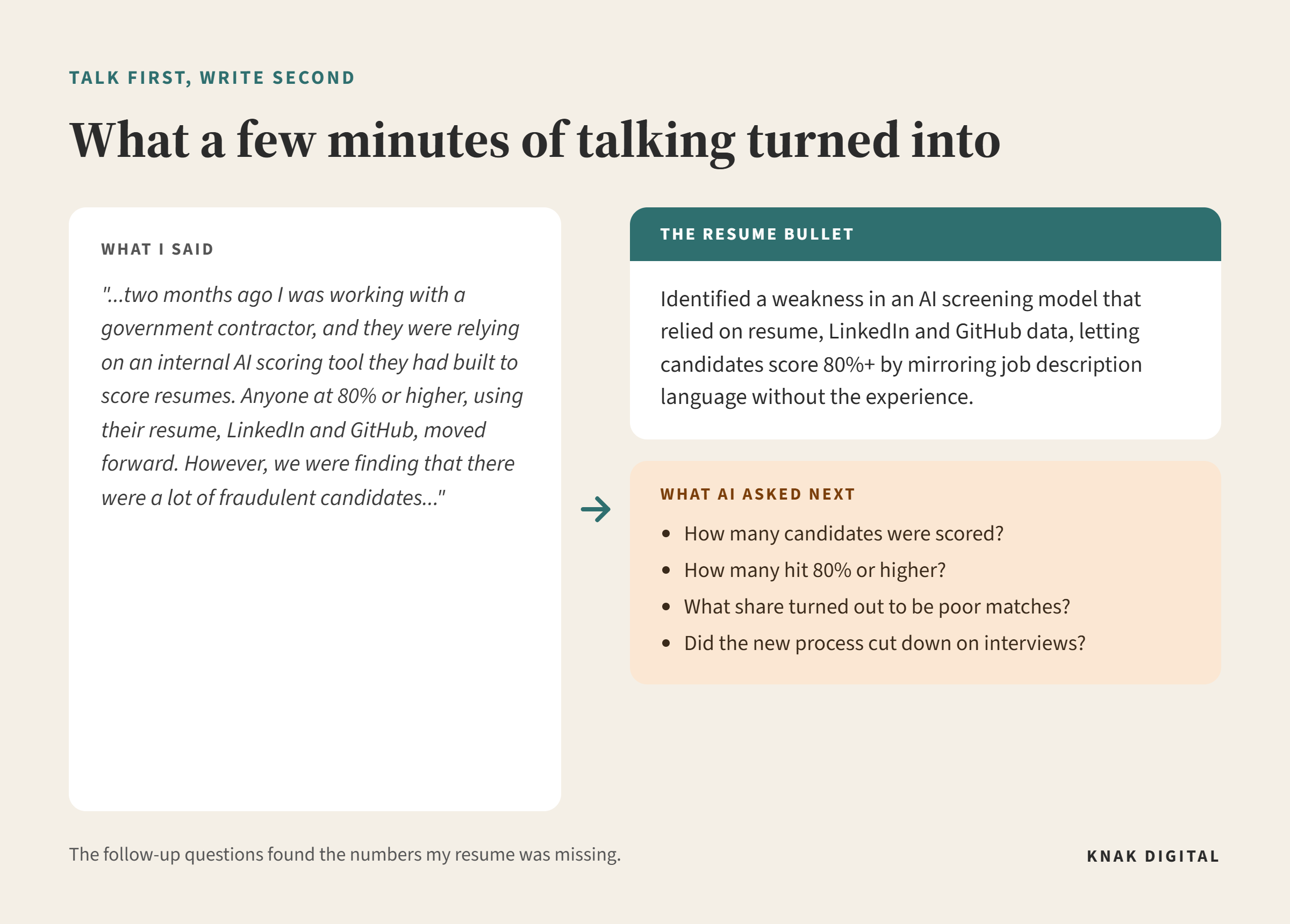
When I demoed this in the webinar, I talked through one of my own recruiting projects. A government contractor had built an internal AI tool to score candidates, and it was passing people who had optimized their resume, LinkedIn and GitHub without the experience to back it up. AI turned a few minutes of rambling into two usable resume bullets. The more useful part was its follow-up questions: how many candidates were scored, how many hit 80% or higher, what share turned out to be poor matches, and whether the new process cut down on interviews. Those are the numbers that make a bullet believable.
Then compare the transcript to your current resume:
“Compare this transcript to my resume. List the projects, responsibilities, results and skills I talked about that are missing or underplayed on my resume, and flag which ones are most relevant to [target role].”
This is the same gap I hear in first screens. Your resume reads as complete to you because you already know the whole story. A side-by-side comparison gives you a more objective look at what’s been left out.
Save the transcript. You’ll use it for your LinkedIn About section, your cover letters, and your interview stories.
3. How to use AI to improve your resume and LinkedIn profile
What to avoid
Don’t ask AI to write your resume from a job title alone. You’ll get a generic draft that looks like everyone else’s.
Don’t list AI tools without context. Hiring managers want to know what you did with a tool, not that you opened it.
Don’t trust AI research without checking it. It can sound confident and still be wrong, and citing something false in an interview is worse than not mentioning it.
And don’t pay for an “AI resume rewrite.” A common scam pattern goes like this: someone posing as a recruiter tells you your resume “isn’t good enough” and refers you to a $500 to $1,000 rewrite service that uses the same free tools you already have. Click here for the playbook these scammers run.
Show what you did with AI
Before adding any AI-related line to your resume, ask whether you used it meaningfully and can point to a result.
Weak: “Used ChatGPT for research and writing.”
Strong: “Used ChatGPT to generate first-draft blog outlines and SEO keyword clusters, cutting content development time by 30% while maintaining quality standards.”
If an interviewer asks how you used AI in your own job search prep, tell them honestly.
Update your LinkedIn profile
Recruiters usually look at LinkedIn before they open your resume, so it deserves the same attention. Give AI your current profile, your brain dump transcript, and 5 to 10 job descriptions for roles you want, then use this prompt:
“I want to improve my LinkedIn profile for the types of roles I am targeting. I will provide my current LinkedIn profile, a transcript of my career experience, and 5 to 10 representative job descriptions for roles I want. Identify:
– The 5 to 8 strongest skills or areas of expertise demonstrated by my experience
– The accomplishments and outcomes that provide the strongest evidence of those skills
– Specific metrics, scope, scale, tools, technologies, industries, or responsibilities that strengthen my positioning
– Important skills or terminology that appear consistently in my target job descriptions but are missing or unclear in my profile
– Experiences highly relevant to my target roles that are buried or underemphasized
– Any claims that sound generic and need stronger evidence
– Any keywords that would be misleading or unsupported by my actual experience
Then give me a concise positioning statement. Only after completing that analysis, rewrite my LinkedIn headline and About section. Use only information supported by my actual experience. Do not invent accomplishments, add skills I don’t have, or stuff the profile with keywords.”
This takes a few minutes, and it’s one of the fastest improvements you can make.
Keep a profile folder
Every prompt in this guide works better when AI has more than one document to draw from. Build a standing set of materials: your resume, your key wins and metrics, your brain dump transcript, notes on how you like to sound, and the roles you’re targeting.
Some AI tools let you store these in a project so they’re available in every chat. If yours doesn’t, keep one “about me” document and paste it in at the start of each conversation.
One warning: if AI suggests headline or resume language for a role that doesn’t match your background, check it before you publish. Optimizing for a role you can’t back up creates a gap that shows up fast in an interview.
4. Should you use AI to write a cover letter?
If a cover letter is required, write one. If it’s optional, spend your time on a tailored resume and direct outreach.
When you do write one, use three steps:
- Find the connection. What’s happening at this company that connects to your experience? If the company is expanding into two new markets and you led two market launches at your last job, that’s your opening.
- Build the evidence. Give AI that connection plus two or three relevant accomplishments, and ask it to connect your evidence to what the company needs.
- Make it yours. Cut the generic language and add your own perspective. It should read like someone who wants this job, not someone applying to 50.
Delete “I was drawn to your mission” on sight. Thousands of other applicants are generating the same sentence.
5. How to use AI to find jobs where you’re competitive
See where you’re competitive
Most job seekers aim too high, too low, or too broad. Before you apply anywhere, find out what your resume is actually selling. Upload it and ask:
“Reading this resume, what can you tell about their strengths? Weaknesses and gaps? What businesses should they target within their proximity where they could be in the top 5% of applicants based on experience and industry exposure?”
Then run the same prompt in a second AI tool and compare the answers.
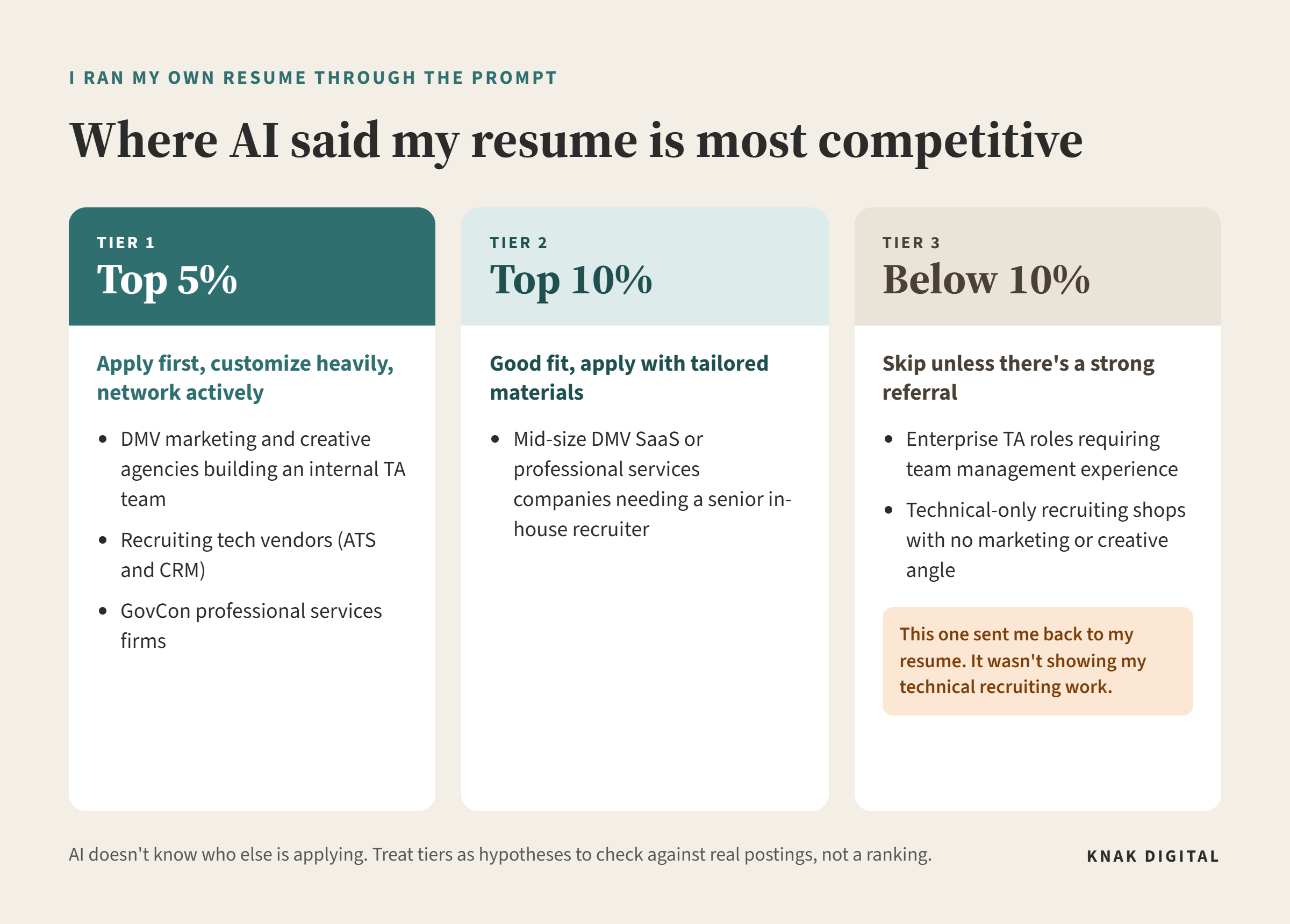
When I ran this on my own resume, the top tier was DMV marketing and creative agencies building internal recruiting teams, recruiting tech vendors, and GovCon professional services firms. The bottom tier included technical-only recruiting shops with no marketing or creative angle, which sent me back to my resume, because a lot of my work is technical recruiting and my resume wasn’t showing it.
There was an important piece of context, though: I had uploaded a version of my resume specifically focused on my marketing and creative experience. So the output was telling me how that particular version of my resume was positioning me, not giving me a definitive assessment of everything I could do.
Treat the results as hypotheses. AI doesn’t know who else is applying, so “top 5%” is an estimate, not a ranking. Check its suggestions against real job postings and conversations with people at those companies.
Decide which jobs deserve your time
Finding jobs isn’t the hard part. Not spending three hours on an application where you’re a mediocre fit is. For any posting you’re considering:
“Here is my resume and a job description. Compare my actual experience to what this role requires, using only evidence in my resume. List the top 3 requirements I clearly meet and what I’m missing. Flag anything in the job description that looks inconsistent or unrealistic. Estimate how much work a strong application would take.”
This only works as well as the job description does, and plenty of them are poorly written. Use the output to inform your decision, not make it.
Tailor your resume without rewriting it
Keep a few versions of your resume rather than one per job. One might be industry-specific, and a couple might target different job titles. Then keep a bullet bank: a running list of your strongest resume bullets, grouped by skill or role type, that you can swap in and out.
“Compare my resume to this job description. Use my bullet bank as the source for any swaps. Don’t rewrite my resume. Give me the 3 to 5 changes that would matter most: requirements I meet but don’t show, bullets from my bank that should replace weaker ones, experience that should move higher, and anything in the posting I should not claim because my experience doesn’t support it.”
Automate the search, not the application
Watching for new postings is the one part of a job search worth automating. Applications and outreach should still come from you.
The free version is simple: set up job alerts on LinkedIn or Indeed, then paste new postings into AI and run the prompt above. If your AI tool supports scheduled tasks (several paid plans do), you can set up a daily search instead:
“Every weekday morning, find new [target titles] posted in the last 24 hours by small and mid-size companies in [location]. Compare them to my background and flag only strong matches. For each, give me the company, title, date posted, salary if available, application link, and why I appear to be a fit. Exclude duplicates, staffing firms, and obvious mismatches.”
6. How to use AI to research a company before you apply
This is the highest-return use of AI in the entire job search, and most people skip it. Use a tool with live web search, such as Claude with web search, Perplexity, ChatGPT with browsing, or Grok, and ask:
“I’m applying for [role] at [company]. Using current sources, give me recent news, funding, or layoffs; culture signals worth knowing; the company’s main competitors; and 3 thoughtful interview questions that show I’ve done my research. Include your sources.”
Free plans handle this well. Paid plans add deeper research modes that pull from more sources for longer reports.
Look up the hiring manager too. Their LinkedIn profile, how long they’ve been on the team, and anything they’ve posted publicly can tell you what they care about and what to emphasize.
Verify everything before you use it. Live search still gets details wrong, and this is exactly the information you’ll end up repeating out loud in an interview.
7. How to use AI to prepare for Job Interviews
Break down the job description
Paste the full job description into AI and ask it to:
- Pull out the top 5 to 6 things the employer is actually screening for.
- Draft likely interview questions, grouped by competency.
- Show where your resume already answers those questions and where you have gaps.
Run a mock interview out loud
Typing your answers isn’t the same as saying them. Use voice mode if you can, and try this:
“Act as the interviewer for [role] at [company]. Ask me one question at a time and wait for my answer. Don’t interrupt or coach me mid-answer unless I ask. After each answer, tell me what landed, what could be stronger, what the interviewer is likely hearing, and give me a score from 1 to 10. Then ask the next question. At the end, give me an overall assessment and the top 3 things to work on.”
On a free plan, keep it to four or five questions per session. Longer mock interviews can hit usage limits partway through.
Build a STAR story bank
Most people practice STAR answers one question at a time and never build a reusable set. Give AI your brain dump transcript and your mock interview feedback, and ask it to identify 5 to 8 distinct STAR stories tagged by competency: leadership, conflict, failure and recovery, ambiguity, and scale. You’ll end up with a small set of stories you can adapt quickly to whatever the question is.
Follow up after the real interview
Right after the interview, record a voice memo and talk through everything you remember: the questions, what you said, what they emphasized, and anything you promised to send. Don’t worry about organizing it. Then use this prompt:
“Here are my notes from an interview I just finished for [role] at [company]. Organize what I remember into: questions I was asked, key points I made, what seemed most important to the interviewer, anything I should clarify or prepare for next time, and anything I committed to sending. Then draft a follow-up note under 120 words that references one specific thing we discussed.”
Add any new stories, questions, and lessons to your prep materials while they’re fresh. Each interview should make the next one easier.
8. How to use AI to find the right people in your LinkedIn network
Most people have hundreds of LinkedIn connections and no clear sense of which ones are real relationships. LinkedIn lets you download your data, including your connections and your message history (in your settings under Data Privacy, “Get a copy of your data”).
Together, those two files can show you who you’ve actually talked to, how recently, who usually reaches out first, and whether you had a real conversation or a one-time “congrats on the new role.”
Sort your connections by the role they can play
Not every connection helps in the same way. Hiring managers can directly influence a hiring decision. Employees and peers can tell you what the team is like and how the hiring process works. Recruiters know what’s open, but they shouldn’t be your whole strategy. And connectors, such as former coworkers, clients, vendors, alumni, and friends, may not work at your target company but can say “I know someone there.”
“Here’s my LinkedIn connections export and my list of target companies. Sort anyone at a target company into hiring managers, employees/peers, or recruiters based on their title. Then flag anyone who worked at [my past companies] as a possible connector.”
The export only shows current company and title, so you’ll need to tag most connectors yourself. You know who your friends and former clients are. AI doesn’t.
Match the message to the relationship
How you reach out depends on how well you know the person. A former coworker you talked to recently can get a casual note asking whether they still know anyone on the team. Someone you connected with years ago and never messaged should get something shorter and more direct, with a clear reason you’re reaching out.
And there doesn’t have to be an open job to make the conversation worthwhile. If you’re interested in a company but don’t see a role that fits, ask about the person, not just the job. What brought them to the company? What are they working on? What is their team like? How did they get into the kind of work they’re doing? You may learn something useful, and you’ve started a relationship before you need anything from them.
With people you don’t know well, don’t ask for a referral. The strongest referrals come from people who can vouch for your work, and many people won’t put their name behind a stranger. Instead, ask who the right person to contact would be. That can still lead to a referral, a direct introduction, or a handoff to HR, and any of those is better than a cold application.
Give people something specific to respond to
Here’s a version of a message I’ve received many times: “I’m looking for opportunities where I can gain experience. Please let me know of any openings at your company or refer me to anyone who may be hiring.” It says nothing about the person and asks a stranger to do their job search for them.
Compare that to this:
“Hi [Name], I’m finishing a marketing degree at [school], and last summer I ran social content for a local nonprofit that grew their event signups by 40%. I saw [Company] hires marketing interns each spring. Who on your team would be the right person to ask about that?”
It’s short, specific, and easy to answer. Use AI for ideas and a first draft, but make sure what you send sounds like you.
A privacy note: only use your own exported data, and keep it on your device or in a tool with a clear data policy.
9. How to use AI to track your job search and evaluate offers
A job search works best as a loop: find, evaluate, research, connect, apply, prepare, interview, follow up, and repeat.
Track your search
“Help me track my job search. Keep a running table with company, title, URL, date found, fit, contact, status, next step, and notes. When I give you a new job or update, add it to the tracker. When I ask, show me the current tracker or tell me which applications need follow-up.”
Every week or two, ask for the full table and copy it into a document. Long chats can lose track of earlier details, and the document doubles as your backup. If your AI tool supports projects, keep the tracker there so it doesn’t get buried in chat history.
Evaluate an offer
When an offer comes in, give AI the details: base salary and bonus, benefits, PTO, commute or remote expectations, title and responsibilities, what you learned about the company, and your own priorities.
“I’m considering this job offer. Help me compare it against my priorities and identify questions I should ask before accepting. Don’t tell me whether I should take it. Show me the tradeoffs I’m making and anything I may be overlooking.”
AI can help you compare, research, run the numbers, and come up with questions about things like healthcare or equity. What matters most, what’s negotiable, and whether to accept are your decisions.
They’ll notice when the writing is generic, which is what happens when AI works without your real experience. If your materials are built from your own transcript and accomplishments, they’ll read like you. If someone asks how you used AI, be honest.
No. Everything in this guide works on free plans. Paid plans add scheduled automation, longer sessions, and deeper research
Any of the major tools will work. For positioning questions, run the same prompt in two tools and compare, since each one will notice different things. LLM models change so fast, any advice I give here about “the best” is likely to be outdated within weeks.
Is it safe to upload my resume and LinkedIn data?
Check the tool’s data policy first. You can remove your address and phone number before uploading, and only use exports of your own data.
Usually not. Many of these services use the same tools you can use for free, and some are outright scams that start with someone telling you your resume isn’t good enough.
Pick one real job you’re interested in. Do the brain dump, check whether you’re competitive, research the company, and find one person in your network to talk to.
Kelli Hrivnak is the founder of Knak Digital, an embedded recruiting firm serving companies in DC, Maryland and Virginia. She has more than 18 years of full-cycle recruiting experience across tech, marketing, GovCon, and go-to-market roles.
- How to Use AI in Your Job Search: 9 Practical Strategies From a Recruiter
- Do You Need an Embedded Recruiter or a Project Search?
- Recruiters Are Using AI to Source. Your LinkedIn Profile Isn’t Built for That Yet
- The Resume Rewrite Scam Targeting Job Seekers (And How to Spot It)
- The Backdoor Reference Check: Fair Game or Foul Play?